Copy text off any video, locked site, or image. Instantly.
Retyping code from video tutorials or writing notes from paywalled docs is a waste of time. Press Alt + C, drag a box over anything on your screen, and the text is on your clipboard. Runs 100% locally in WebAssembly — private by architecture.
Free forever for unlimited English scans · No signup required · Inspect network logs below
SnapTextify is a secure, 100% offline OCR Chrome extension powered by local WebAssembly binaries to instantly copy text and extract code from YouTube videos, images, and copy-restricted websites. Operating with zero server uploads, it delivers highly accurate, private, and zero-latency (~300ms) image-to-text conversion directly in your browser sandboxed environment.
Note: You can audit and verify this offline capability at any time by monitoring the browser Developer Tools Network tab (F12) during a scan overlay copy operation. For complete transparency, we have open-sourced our core offline OCR WebAssembly model: inspect the GitHub Proof-of-Concept Repo.
Verify it yourself: Disconnect your WiFi.
I believe privacy shouldn't rely on trust. After installing the extension, turn off your internet completely and drag to capture text from any local video or offline PDF. It works exactly the same. That's because the WebAssembly OCR engine runs in a local sandbox inside your browser. No cloud, no trackers, no leak paths.
The text is right there. So why can't you copy it?
Locked inside videos
Code snippets in programming tutorials, instructions in AI demo clips, or definitions in video lectures.
Trapped in images
Text inside system architecture diagrams, screenshot slides, infographics, and scanned slide decks.
Blocked by websites
Copy-protected online documentation, locked academic archives, or paywalled articles.
You end up squinting and retyping it character by character. SnapTextify ends that in one keystroke.
Three steps. Under a second.
No sign-ups, no complex setup — grab any screen text in three simple micro-actions.
Freeze
Press Alt + C (or click the extension icon) to instantly freeze your screen.
Drag
Draw a box around the text you want to grab — code, a prompt, a table, or anything visible.
Done
The text is instantly copied to your clipboard. Simply press Ctrl + V to paste it anywhere.
See SnapTextify in Action
Unlock copy-restricted environments instantly. Here are two more common ways developers use SnapTextify daily:
Copy Locked Descriptions & Code
In this tutorial, we will set up our local development environment. Here is the configuration prompt you need to copy:
Extract Text from Infographics & Images
A Premium Grab Experience
Take a visual tour of SnapTextify's high-speed OCR, script manager, and smart Gemini AI workflows.
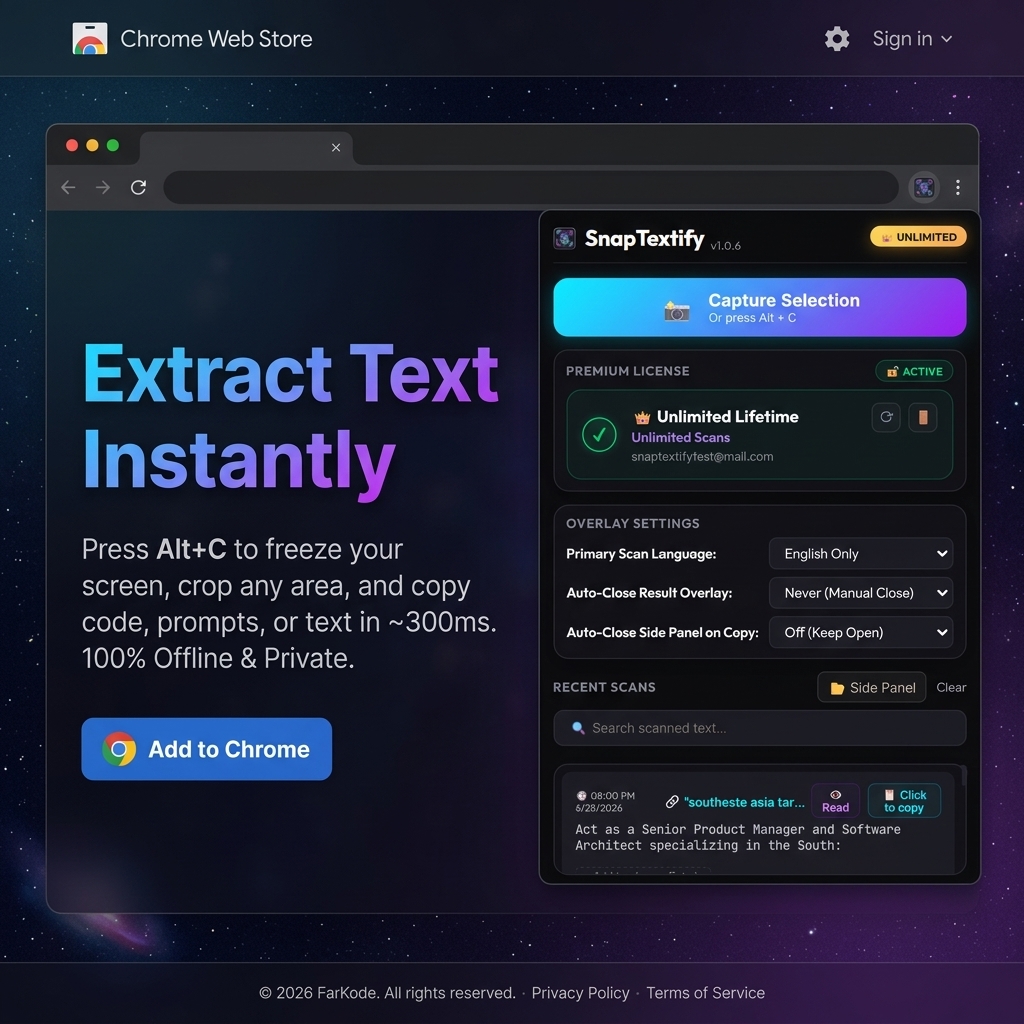
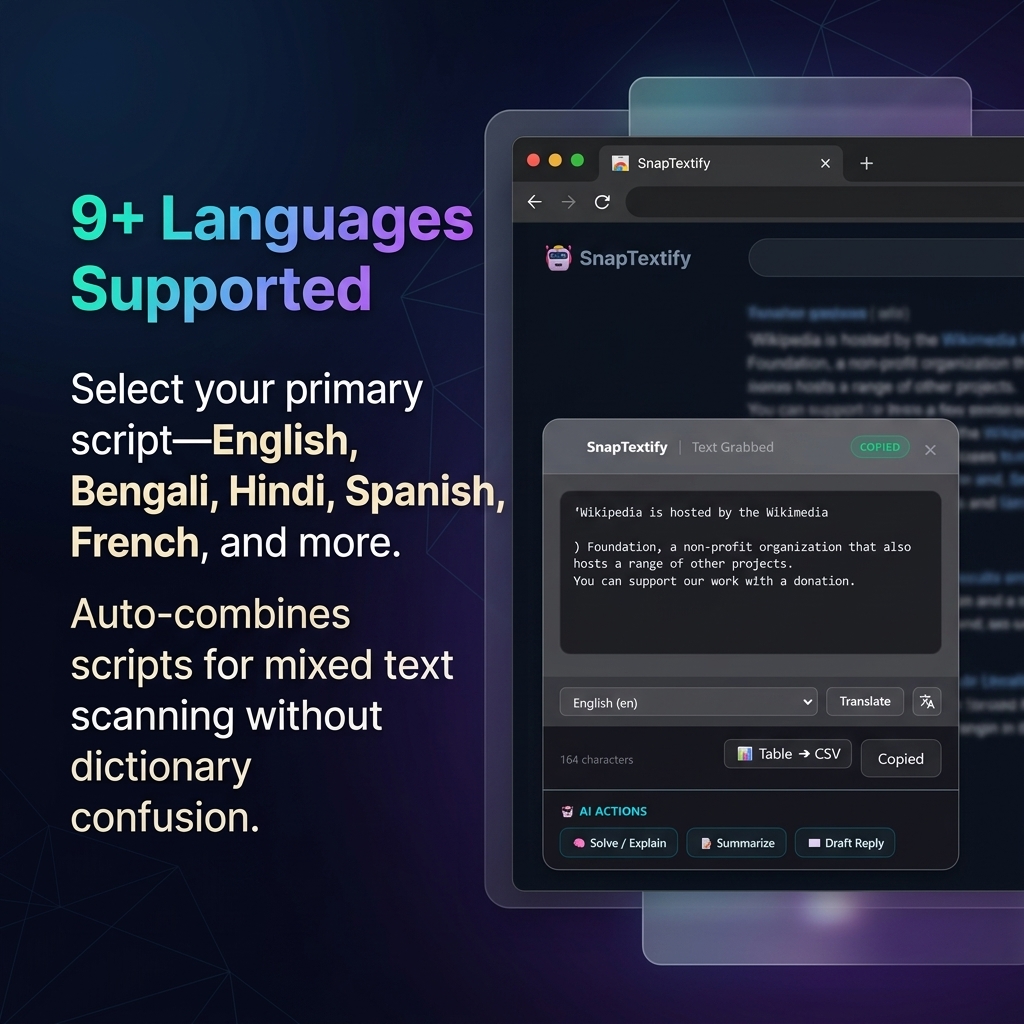
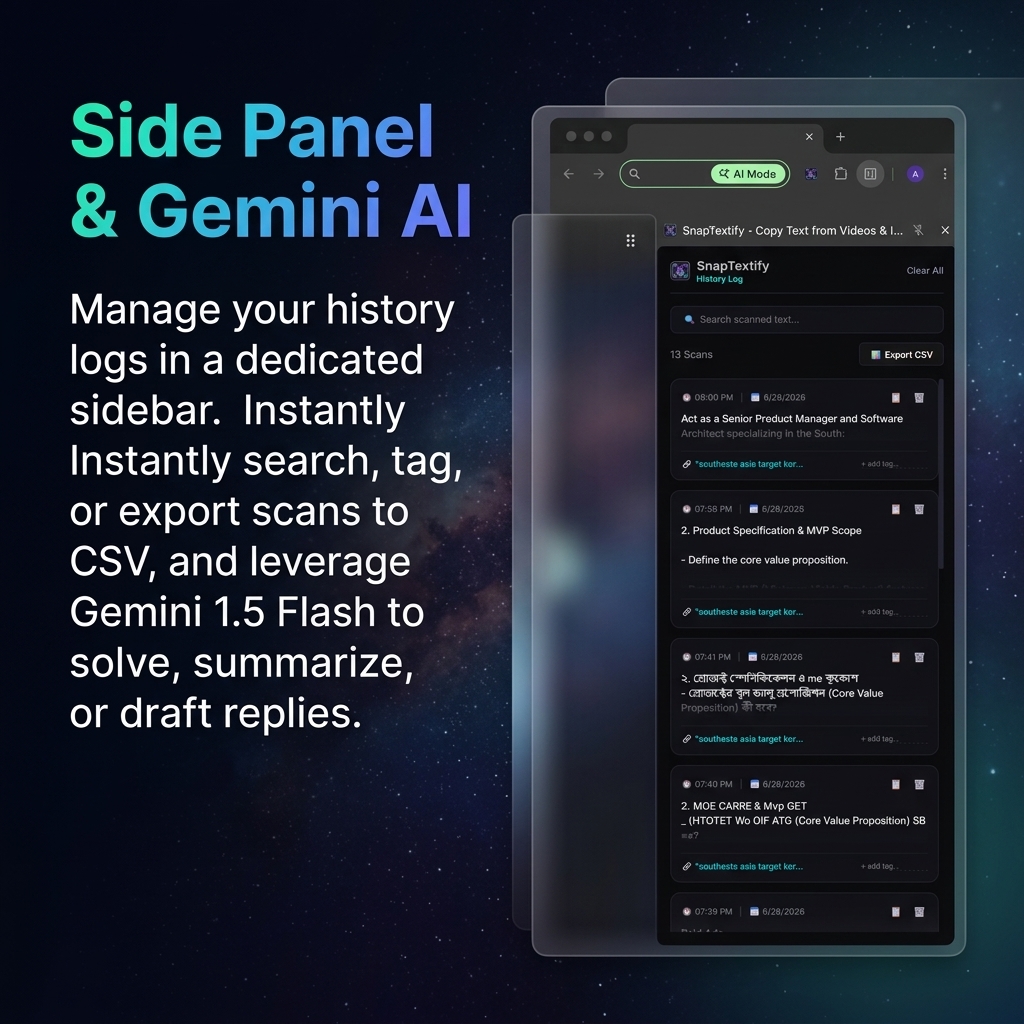
Everything you need to grab text — nothing you don't.
A highly optimized set of tools designed to make text capture instant, smart, and fully private.
100% Offline OCR
Tesseract WebAssembly runs entirely in your browser. Zero screenshot data ever touches a server. True privacy by architecture, not by promise.
Works on Any Video
YouTube, Vimeo, Coursera, Udemy, any HTML5 player. Pause, select, copy code, prompts, or notes in milliseconds.
9 Languages, Auto-Detected
English, Bengali, Hindi, Spanish, French, German, Portuguese, Russian & Arabic — with smart script prioritizing so mixed text stays accurate.
Table → CSV (Premium)
Grab a table from a video or image and export clean CSV data in seconds — processed fully offline on your machine.
Smart Gemini AI Actions (Premium)
Solve formulas, explain code, summarize long passages, or draft context-aware replies on extracted text in one click.
In-Popup Translation (Premium)
Translate grabbed text into 11+ languages directly inside the selection window without losing your context.
Side Panel Scan Manager (Premium)
Full-height history sidebar workspace. Search text, add custom tags, and export your entire scan log history to CSV.
Who Uses SnapTextify?
Professionals and students across the world rely on SnapTextify every day to copy text from screens they can't normally select.
Developers
Copy code snippets, terminal commands, and configuration prompts directly from YouTube coding tutorials — without pausing the video and typing everything manually.
Students & Researchers
Extract formulas, definitions, and lecture notes from recorded classes, presentation slides, and academic infographics in seconds flat.
Content Creators & Marketers
Grab text from competitor websites, social media graphics, and web screenshots for research and content planning — no retyping required.
Your screen is yours. We built it that way.
Most "screen reader" tools quietly send your screenshots to a cloud API. SnapTextify compiles OCR into WebAssembly and runs it inside a sealed browser sandbox. Your captures are processed locally and discarded. The only thing that ever contacts our server is an optional license check — never your content.
Why SnapTextify Wins
A fair comparison between SnapTextify, online transcription tools, and manual typing.
| Feature / Metric | SnapTextify | Online OCR Tools | Manual Typing |
|---|---|---|---|
| 100% Offline Processing | ✅ Yes (100% local WebAssembly) | ❌ No (Server-dependent) | ✅ Yes (Self-type) |
| Data Privacy & Safety | 🛡️ Absolute (In-memory, zero server uploads) | ⚠️ Risk (Images uploaded) | 🛡️ Safe |
| Speed & Latency | ⚡ ~300ms (Instant client-side inference) | ⚠️ 3 - 10s (Network latency) | ❌ Slow (Minutes of typing) |
| YouTube Video Copying | ✅ Seamless (Instant Alt + C overlay) | ❌ Complex (Need screenshot first) | ⚠️ Tedious (Pause/Play frequently) |
| 9-Language Auto-Detection | ✅ Yes (Multi-lingual auto-detection) | ⚠️ Manual (Select from dropdown) | ✅ Yes (Human brain) |
| In-Popup Translation | ✅ Yes (11 languages + Google Translate) | ❌ No (Must copy-paste to translate page) | ⚠️ Manual (Translate manually) |
| Smart Gemini AI Actions | ✅ Yes (Gemini 1.5 Flash solved/summarized in-popup) | ❌ No (Raw text only, no reasoning helper) | ❌ No (Must manually copy to ChatGPT/Gemini) |
| Side Panel Scan Manager | ✅ Yes (Dedicated sidebar log + Tagging + CSV export) | ❌ No (Session history cleared immediately) | ❌ No (Must document manually in local text files) |
Comparison data is verified as of May 2026. Online OCR tools typically refer to web-based cloud upload utilities.
Latest Guides & Resources
Deep dives, comparisons, and step-by-step tutorials to get the most out of SnapTextify.
How to Copy Text from Any YouTube Video (3 Methods)
Learn the easiest ways to extract text, transcripts, descriptions, or code directly from YouTube videos. Complete comparison of manual, transcript, and OCR extension methods.
Read Article →5 Best OCR Chrome Extensions in 2026 (Compared)
An in-depth, hands-on comparison of the leading browser-based OCR tools. See how they rank on speed, privacy, accuracy, offline support, and pricing.
Read Article →How Developers Extract Code from Tutorial Videos
Stop manually retyping code from programming tutorials. Discover how developers leverage offline OCR extensions to capture clean, formatted code blocks in milliseconds.
Read Article →Frequently Asked Questions
Got questions? We have answers. Find everything you need to know about SnapTextify below.